OpenAPI Explorer
This example shows a three-pane explorer:
- operations list
- operation details
- schema details
Unlike activity_monitor, this example is not driven by realtime updates. It is driven by structured information browsing.
That makes it a useful reference for a different class of terminal application: not a monitor, but an explorer.
Run it
cargo run -p ansiq-examples --example openapi_explorer -- --input /path/to/spec.yamlYou can also pass a remote URL:
cargo run -p ansiq-examples --example openapi_explorer -- --input https://example.com/openapi.yaml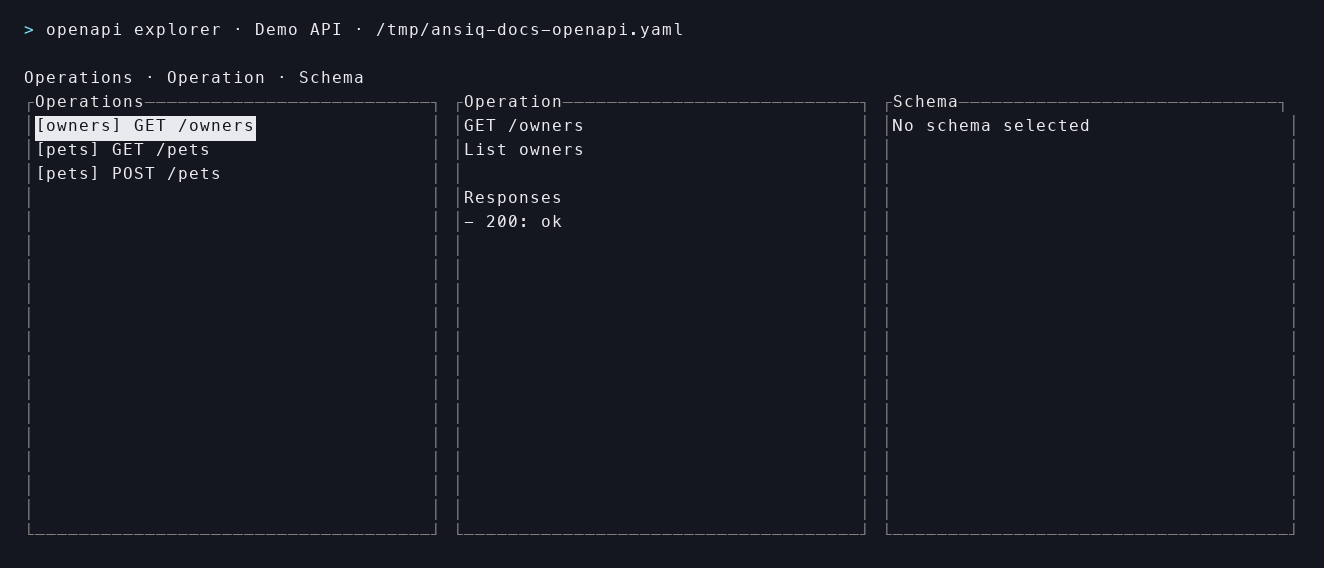
The real openapi_explorer example running in a terminal.
What this example demonstrates
It is useful for understanding:
- split-pane layout
- selection and detail browsing
- local file and remote URL loading
- how structured data can be turned into a TUI explorer
Widgets to study alongside this example
Why this example matters
Many terminal examples only show:
- lists
- tables
- forms
But a real TUI often also needs to answer a different question:
How do you browse a large structured document in limited terminal space?
That is what this example is really about.
It is not a request client. It is:
- a document browser
- a navigation surface
- a schema inspector
What to observe at runtime
1. The left pane is not raw YAML or JSON
It is a navigation model prepared for browsing. That is an important architectural choice: the UI should not read raw OpenAPI structure directly.
2. The middle and right panes have different responsibilities
- middle: operation details
- right: schema or reference details
That split works well in Ansiq because it gives navigation, primary detail, and supporting detail their own regions.
3. Most complexity lives in data preparation
This example is a good reminder that once an application deals with real formats, the hardest part is often not the UI itself, but:
- loading
- parsing
- intermediate models
- selection logic
How to read the code
A good order is:
loaderparsermodels- scenario state
- only then the three-pane layout
If you start with the UI tree, it will look like “just three panes”. The real lesson is how OpenAPI documents are transformed into a browsing model that fits terminal interaction.
What this example does not do
It intentionally does not yet implement:
- sending requests
- history
- command mode
- advanced filtering
That keeps the boundary clear: first build a strong browser, then decide whether it should become an API client.
Recommended companion reading
To connect this example back to the Guide and Internals, read: