List
List is the simplest selection widget.
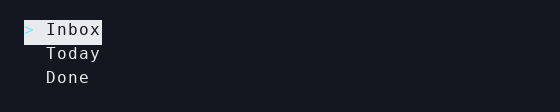
Smallest example
let list = List::new(["Inbox", "Today", "Done"])
    .selected(Some(0))
    .highlight_symbol("> ")
    .on_select(|index| Some(Message::Select(index)))
    .build();
Use List when
- one item is active at a time
- arrow-key navigation should be obvious
- item text is more important than tabular layout
Key builder methods
List::new(...).items(...),.item(...).selected(...),.offset(...),.state(...).highlight_symbol(...),.highlight_style(...).scroll_padding(...).on_select(...)
State object
If selection and scroll position need to stay explicit, use ListState:
let state = ListState::default()
    .with_selected(Some(0))
    .with_offset(0);

let list = List::new(items).state(state).build();
Where to see it in examples
- List Navigation: the smallest complete selection example
- OpenAPI Explorer:
Listinside a multi-pane browser
Last updated on